 CODDY is finalist of international award #MyVmeste 2022 in “Responsible business” nomination
 CODDY is official partner of Acer company
 CODDY courses are certified in accordance with European standards and accredited by HiSTES (High School Teachers European Society)
 Coddy Donate is participant in the competition of projects in the field of social entrepreneurship "The best social project of the year-2022”
 CODDY is GOLD GLOBEE® WINNER in category Company of the Year | Franchise
 The charity project “Free coding classes for kids with special needs” is recognised as the Best social online project
 en
en
In the world of the Python programming language, which is considered one of the most beginner-friendly, there are key data structures that underpin information processing. Today, we invite you into the fascinating world of "dictionaries".
Dictionaries in Python are not just containers for data, they open doors to the amazing possibilities of this language. They simplify the lives of novice programmers and expand the horizons of experienced developers.

Dictionaries in Python are modifiable mappings of references to objects accessible by key. Dictionaries are data structures in which unique keys represent values.
The key and value are separated by a colon, key-value pairs are separated by commas, and the entire dictionary is bounded by curly braces {}.
In simple words, it is something like a phone book, where under each number there is a person.


A key can be an arbitrary unchangeable data type: different numbers, strings, tuples. A key in the dictionary cannot be a set, but it can be an immutable element of frozenset type.
The value of a dictionary element can be any changeable or immutable data type.

Creating a dictionary in Python is formalized by curly braces. Inside them are key-value pairs. The key is written first, followed by the value, followed by a colon.
The pairs themselves are separated from each other by commas.
dict = {
'Fortnite' : 'Epic Games',
'Grand Theft Auto V' : 'Rockstar Games'
}
Ideally, you can not specify any values for the keys at all: the language will automatically substitute None values for them. But the dictionary will still work.
dict = {
'Fortnite',
'Grand Theft Auto V'
}
Let's print the elements of the dictionary using the print function:
print(dict)
{'Fortnite', 'Grand Theft Auto V'}
Only the keys are shown. Now let's try to print the full dictionary with values:
dict = {
'Fortnite' : 'Epic Games',
'Grand Theft Auto V' : 'Rockstar Games'
}
print(dict)
{'Fortnite' : 'Epic Games', 'Grand Theft Auto V' : 'Rockstar Games'}
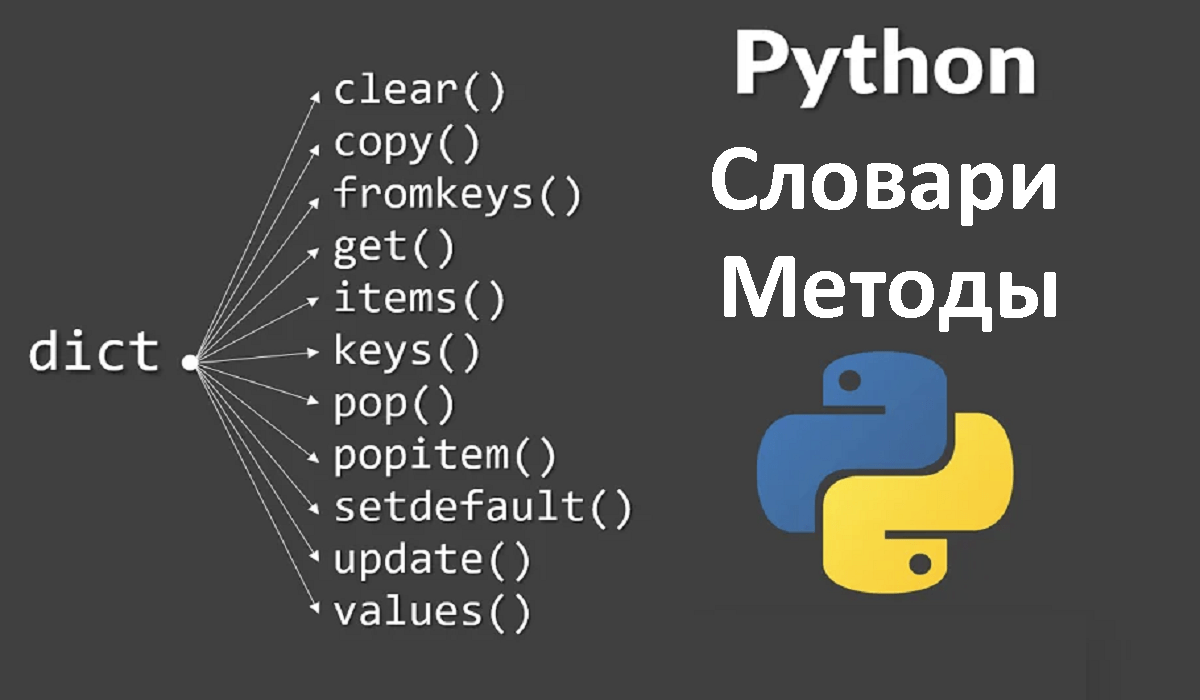
Dictionaries in Python have many different useful methods to help you work with them. Here are just a few of them:
copy() - create a copy of the dictionary
dict1 = {
'car' : 'car',
'apple' : 'apple',
'orange' : 'orange'
}
dict2 = dict1.copy()
print(dict2) #Print {'car' : 'car', 'apple' : 'apple', 'orange' : 'orange'}
get() - get value by key
dict = {
'car' : 'car',
'apple' : 'apple',
'orange' : 'orange'
}
print(dict.get('car')) #Print 'car'
clear() - clearing the dictionary
dict = {
'car' : 'car',
'apple' : 'apple',
'orange' : 'orange'
}
dict.clear()
print(dict) #Print {}
keys() - get all the keys of the dictionary
dict = {
'car' : 'car',
'apple' : 'apple',
'orange' : 'orange'
}
print(dict.keys()) #Print dict_keys(['car', 'apple', 'orange'])
values() - get all the values of the dictionary elements
dict = {
'car' : 'car',
'apple' : 'apple',
'orange' : 'orange'
}
print(dict.values()) #Print dict_values(['car', 'apple', 'orange'])
items() - get all items in the dictionary, including keys
dict = {
'car' : 'car',
'apple' : 'apple',
'orange' : 'orange'
}
print(dict.items()) #Print dict_items([('car', 'car'), ('apple', 'apple'), ('orange', 'orange')])
pop() - removes and returns the value of the key
dict = {
'car' : 'car',
'apple' : 'apple',
'orange' : 'orange'
}
print(dict.pop('car')) #Pop up 'car'
print(dict) #Pop up {'apple' : 'apple', 'orange' : 'orange'}
popitem() - removes and returns the name and value of the key
dict = {
'car' : 'car',
'apple' : 'apple',
'orange' : 'orange'
}
print(dict.pop()) #Print ('orange', 'orange')
print(dict) #Print {'car' : 'car', 'apple' : 'apple'}
setdefault() - get value by key if such a key is present in the dictionary. When such a key is not present, it is created with the value None (if it is not specified in the properties). Let's look at an example:
dict = {
'car' : 'car',
'apple' : 'apple',
'orange' : 'orange'
}
print(dict.setdefault('car') #Print 'car'
print(dict.setdefault('home', 'home') #Print 'home'
print(dict) #Print {'car' : 'car', 'apple' : 'apple', 'orange' : 'orange', 'home' : 'house'}
update({}) - update values by key, adding new keys:
dict = {
'car' : 'car',
'apple' : 'apple',
'orange' : 'orange'
}
dict.update({'car' : 'automobile', 'home' : 'home'})
print(dict) #Print {'car' : 'car', 'apple' : 'apple', 'orange' : 'orange', 'home' : 'house'}
It is better not to memorize bare theory, but to practise what you know right away. You can start, for example, with the free exercises on stepik.org. And to quickly find the right method and not to google every time, you can already start learning in full at the CODDY programming school. Mentors will help you sort out all your mistakes and put all your knowledge on the shelves.

Let's add an object to our dictionary. To do this, we need to come up with a value for the key. Let's look at an example:
dict = {
'car' : 'car',
'apple' : 'apple'
}
dict['orange'] = 'orange' #In square brackets, give the key name and the value after the equals sign
print(dict) #Print {'car' : 'car', 'apple' : 'apple', 'orange' : 'orange'}
To delete a key and its object in the dictionary, use the del method, specifying the name of the key in square brackets:
dict = {
'car' : 'car',
'apple' : 'apple',
'orange' : 'orange'
}
del dict['orange']
print(dict) #Print {'car' : 'car', 'apple' : 'apple'}
To output all keys and values in order, we use a loop with the in operator:
dict = {
'car' : 'car',
'apple' : 'apple',
'orange' : 'orange'
}
for key in dict:
print(key, dict[key])
#print:
#car car
#apple apple
#orange orange
To output a value by key, we use the dictionary name and square brackets with the name of the desired key:
dict = {
'car' : 'car',
'apple' : 'apple',
'orange' : 'orange'
}
print(dict['car']) #Print 'car'
Dictionaries in Python are powerful weapons that can help you with a variety of tasks. Don't be afraid to experiment, create and apply dictionaries to your projects. Remember, knowing this data structure makes you a true magician in the world of Python.
Let's explore and make magic happen with dictionaries!