 CODDY is finalist of international award #MyVmeste 2022 in “Responsible business” nomination
 The charity project “Free coding classes for kids with special needs” is recognised as the Best social online project
 CODDY is GOLD GLOBEE® WINNER in category Company of the Year | Franchise
 CODDY courses are certified in accordance with European standards and accredited by HiSTES (High School Teachers European Society)
 CODDY is official partner of Acer company
 Coddy Donate is participant in the competition of projects in the field of social entrepreneurship "The best social project of the year-2022”
 en
en
The design is the first thing a user sees when opening an application or visiting a web page. It should be easy to use, look nice and leave a good impression so that readers want to come back to it. This is the responsibility of the UX/UI designer, whose task is to design web applications in a practical and beautiful way.
From English “user experience".
This is how the reader or customer interacts with a web page. People like structure, accessibility of information and short and clear texts. Clarity plays a major role here - whether a user stays on the site or not depends on:
To work out the UX designer needs to do a little research:
We want to return to an establishment with pleasant service. The design of the website works the same way, and the task of the UX designer is to create the best service for readers.
This is the interface itself.
All buttons, colors, their composition and the entire visual component are the work of a UI designer. It creates a space for the reader in which it is easy to navigate and which will look good and modern.
UX analyzes the target audience of a website or application and develops a page model, and UI brings it to life. These areas are closely related, so they are often handled by one specialist.
Yes and no. UX and UI are narrower areas of web design.
Both are engaged in the design of websites, but the web designer makes them from scratch and completely, while UX/UI specialize in the target audience and create an interface specifically for it. Nevertheless, employers often mix these two concepts and here we already have to look at the tasks of a specific vacancy.

There is also a concept of “product designer” in the field of web design. This is a profession related to UX/UI, where the designer works on the site for a long time, taking into account all the wishes of users and promoting the site.
Perseverance, creativity and the ability to work in a team belong to many professions, and the UX/UI designer is no exception. But what special skills do you need to work in this field?
Analyzing the target audience, the specialist must understand how it interacts with the product. To do this, he puts himself in the user's place and answers the questions “What will make the reader stay? What would I, as a reader, not like?”. This is the beginning of the creation of a website or application that takes into account not only the interests of the company, but also customers.
The answers to these questions, as well as the portrait of their target audience, the UX/UI designer should keep in mind throughout the work. The user's convenience is his main task.
It is not necessary to be able to draw, but without a base – knowledge of the theory and psychology of color, composition and forms – the work of any designer is impossible. The result directly depends on the proper use of space, colors and layout of details.
A brand can say a lot about a product. People are mostly more likely to take or pay attention to a familiar cover, and sometimes one logo is enough to confirm the quality. We have already figured out the importance of the client's perception of the picture, but it is also important to make this picture recognizable.
The sustained overall style of the product is a guarantee that it will be remembered and distinguished from competitors. Whether it will be remembered – bad or good – depends on the quality of the work of the UX/UI designer.
The designer does most of the work in graphic editors. To be able to quickly create layouts (we'll talk about them later), eliminate errors and work comfortably with the team, you need to know your working field well.
Here are a few basic editors:
Adobe After Effects is widely used in all areas of animation design, from websites to advertising and movies. Start your steps towards the future small – we will show that it is not difficult at all in our course on creating animation in Adobe After Effects with CODDY.
When a designer receives a task, the first thing he understands is what he was assigned. You can't create a quality pizza delivery app without knowing what a pizza delivery app looks like, right? Therefore, the first item on our list is the compilation of a general idea of the result and the collection of references (examples).
In addition, the specialist thoroughly studies the websites and applications of competitors. Useful chips that can be adopted, and disadvantages that should be taken into account when developing your product.

Analyzing the niche to which his product will relate, the designer thinks in advance about the overall appearance of the site: the palette, the location of windows and information blocks.
Answering the question “What needs to be done?”, moving on to “For whom?”. It is not difficult to start from the subject of the application and present an approximate portrait of its users. Gender, age, field of activity, main interests and geography of residence – all this adds up to the overall picture.
If the portrait turns out to be too general, you can divide the audience into groups, for example, by age and/or income, and take into account the interests of each of them. This way the product will respond to the requests of all potential customers.
Here comes the empathy we wrote about above: the UX/UI designer puts himself in the place of his target audience. Based on approximate data about users, it is much easier to predict their behavior and think through the application in the most appropriate way
So the specialist outlines which sections the site needs and where they will be located, structures them and identifies the main pages. At the same time, he takes into account his analysis of competitors, determining what will distinguish his project from the rest.

The correct structure helps to highlight the main thing and make a plan for the user's navigation through the pages. It is important that all the basic information is easily accessible!
It is with the prototype of a website or application that the designer's work with the UI begins. It can be divided into several stages:
In one of the editors that we listed above, a low-detailed wireframe is first created – a sketch of the future site. Then the designer goes from the general to the particular, gradually adding details and embodying what was conceived at the stage of the structure.
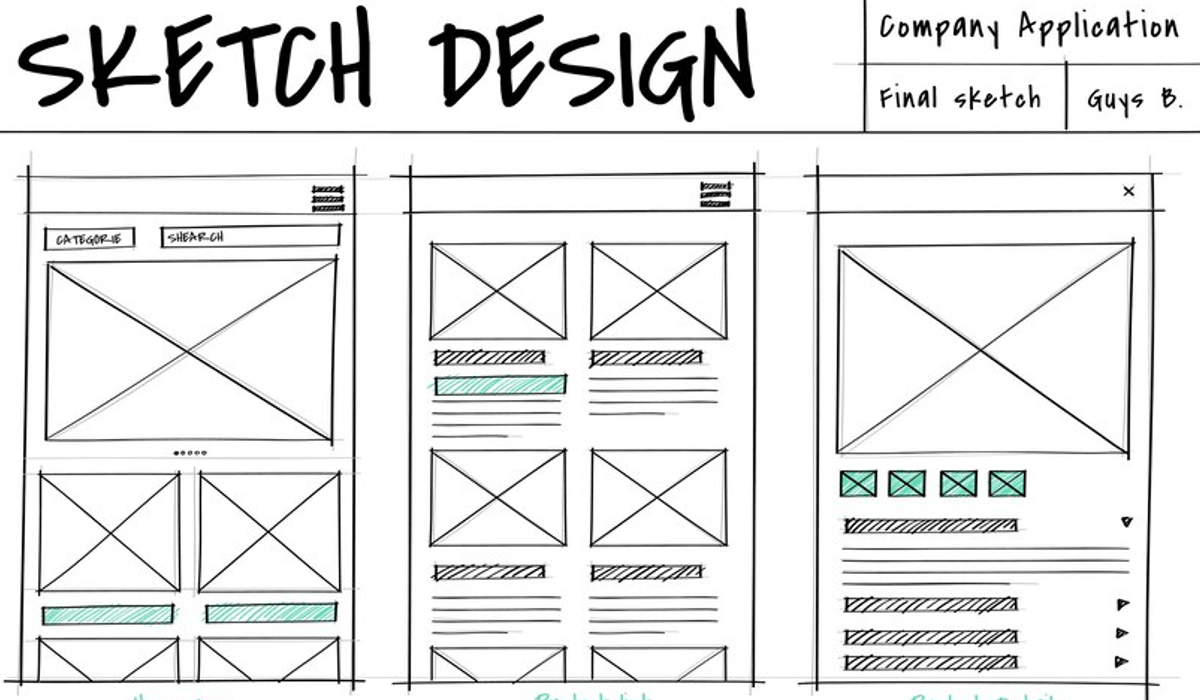
In other words, wireframe is the “skeleton" of the product. It shows what the site consists of and how it will work, but it does not yet have a visual component.
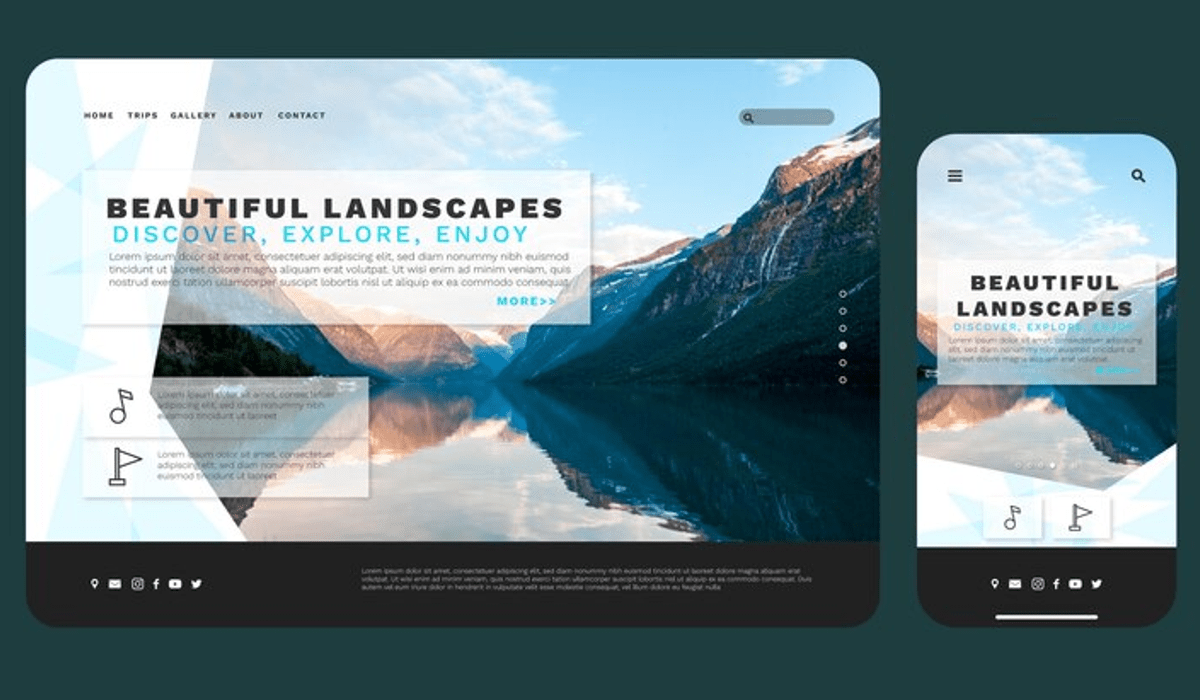
A detailed wireframe in color becomes a layout.
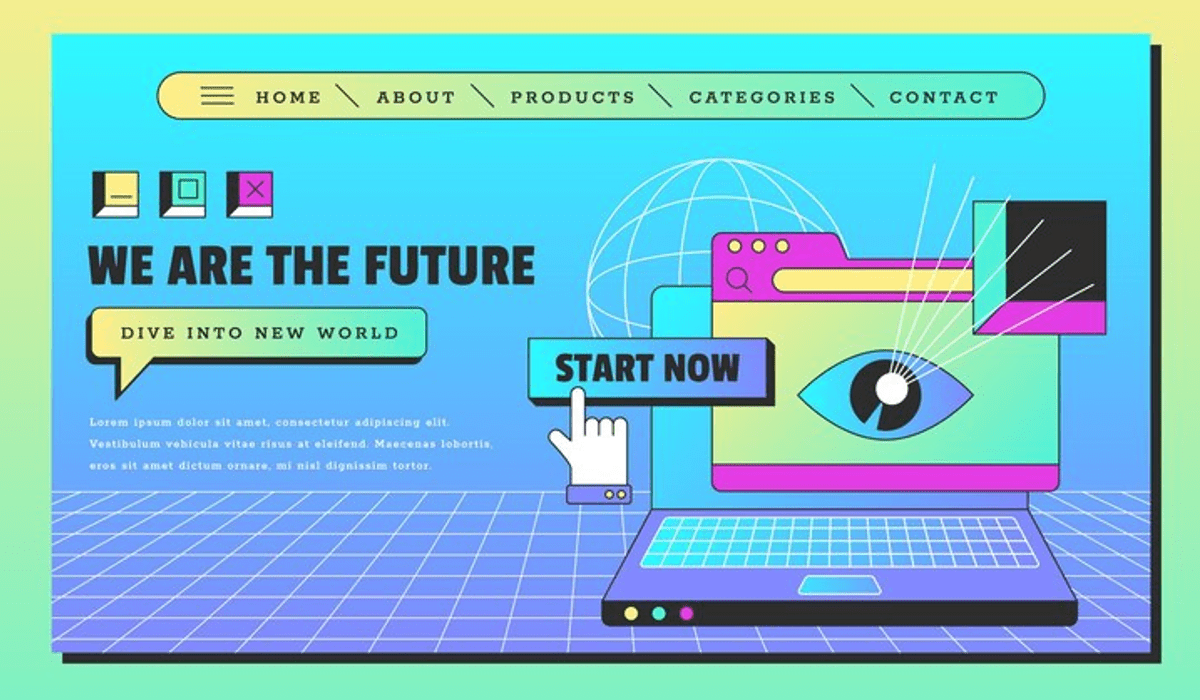
Interactive prototype – the last stage of work on the product layout.
The product is ready. Now we need it to work for everyone and everywhere. Here the designer proceeds to the next step…
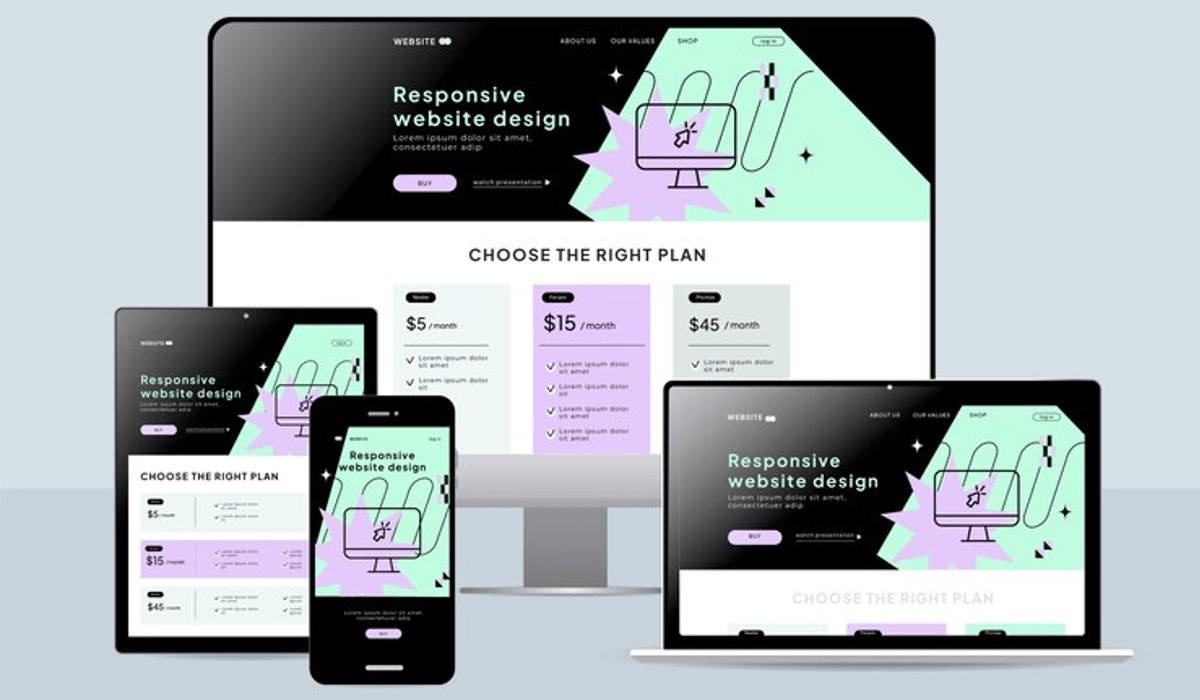
Some sites even change their design from phone to computer. This is the merit of UX/UI designers.
It is easier for mobile applications in this matter: they have an approximate standard and they cannot be opened on a large computer screen. But you will have to tinker with pages on the Internet: different browsers also need to be taken into account.
The prototype, as a model of the future product, is demonstrated to the customer and shareholders, and also attracts investors with its help. This is the result of all the previous work of a UX/UI designer.
The prototype is ready, but the work continues: now it needs to be tested in action. This can be done by professional colleagues or a focus group from the target audience (qualitative testing), or you can give your work to a large sample of users (quantitative testing).
Both options are good, but they look at the finished layout differently. So, feedback from users shows how the site is perceived by ordinary readers and customers (for whom, most likely, it is being made), but does not give professional advice.

All stages of the work of a UX / UI designer contain testing elements. At least on the developer's device, its layout should work properly, so it is important to check yourself from time to time.
After collecting all the feedback and suggestions, the specialist puts the finishing touches: fixes bugs (errors), adds and removes the necessary and unnecessary. Now that everything has been taken into account and finalized, the product is ready to be released.
Even after the release, the site needs to be improved. Now it needs to be maintained, monitor bugs and eliminate them in time, collect feedback and regularly improve for the convenience of users. Follow the trends in the world and in the market, test and update your brainchild.
Is undeniable. The pandemic has given impetus to the development of the digital industry, and now more and more institutions and businesses want to create their own websites and applications for online promotion and convenient interaction with customers: according to the US Bureau of Labor Statistics, the demand for web designers (including UX and UI) will increase by 16% in the next ten years. This is much faster than the average.
Right now on the russian largest job search site hh.ru more than 700 vacancies of this profession have been posted. Most of them allow you to work remotely, so you don't have to worry about moving to another city, sitting in an office and a set schedule.
The salary is about 80,000 rubles for beginners and 200,000 rubles for leading UX / UI designers in major cities of Russia, and 40,000 and 150,000 rubles in the regions, respectively.
As for working abroad, according to the Glassdoor 2022 research, the UX designer ranks 24th in the top 50 jobs in the USA with an average salary of $97047 per year (about 8.5 million rubles) and 11th in the same top in the UK, where the average salary of this profession is £46382 per year (about 5 million rubles).
Just like any modern IT profession: at university or on online courses. Self–study is also an option, but you lose in advance the lion's share of useful materials and direct communication with teachers who are experts in their field.
Now employers no longer so often require a “tower”, so we recommend courses: they help you master and enter the profession in less than a year and immediately create a portfolio. It is often based on him that the company decides whether a specialist is suitable for them.
Art or any design education will be a plus in this profession: it provides a base from which it will be easier to grow, developing in IT. In addition, developed creative thinking will definitely be an advantage.
Before deciding on the choice of profession, we advise you to take a closer look at its internal kitchen. UXJournal (in Russian about UX/UI) and Design Pub (about design in general), and UX Booth (in English for beginners and experienced UX designers) will help you with this.
There are also many free online learning resources, such as Uideo (lectures about design in English), Prototypr (all about prototyping) and UXPUB (about AdobeXD, Figma and other useful programs). Go ahead!
Most of the Internet resources are initially published in English. The Python and Technical English course with CODDY will help you get into IT and learn everything firsthand. We will teach you how to be on trend.